Complete platform access
Run routes, customer visits, follow-ups, orders, photos, notes, reports, and manager controls with no feature restrictions during the trial.
SalesTracker Pro plans routes, verifies visits, captures outcomes, and brings follow-ups, orders, photos, and notes into one live management view.
Give each field user a clear plan, priorities, and next actions.
Keep visits, orders, photos, notes, and follow-ups in one place.
See field activity, customer needs, and sales performance as they happen.
Less admin, less searching, and less uncertainty. Every sales rep sees the customers, tasks, insights, and sales information that help them do their best work.
Scheduled calls, important follow-ups, missed customers, and useful customer insights are ready before the day begins.
Location-aware check-ins keep customer records accurate while reps capture outcomes, comments, photos, and next actions.
Capture a sales order, customer reference, new contact, prospect, or customer photo without leaving the workflow.
Queued field activity stays visible and synchronises when the app reconnects, and the PWA installs directly from the browser.
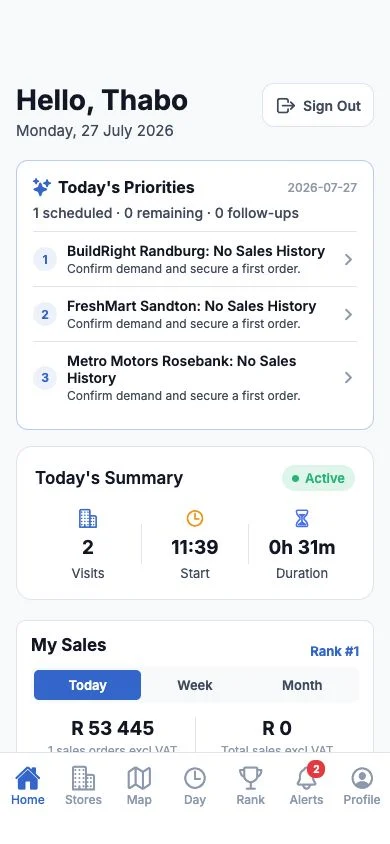
SalesTracker Pro joins planning, customer visits, field activity, and team follow-through. Nothing important is left in a separate notebook or message thread.
Build sales call cycles, service schedules, merchandising visits, or upload a driver's ordered daily route.
Start with location enabled, navigate to assigned customers or stops, and complete the right type of field activity.
Record sales, completed work, deliveries, issues, notes, orders, tasks, photos, customer contacts, and observations.
Missed visits, overdue tasks, order sync issues, and customer risks return as helpful reminders and focused admin actions.
Each team member has a field role, and each company chooses which app features are visible. A driver does not need a sales leaderboard, while a sales rep can still capture orders and targets.
Plan customer calls, check in on location, capture sale or no sale, create orders, schedule follow-ups, and see useful customer buying insights.
Complete in-store visits, add shelf and display photos, record stock or competitor observations, raise issues, and produce clear client reports.
Assign customer jobs, record completed work or required follow-ups, add notes and photos, and keep the office informed without extra paperwork.
Upload a daily CSV route, assign ordered stops to a driver, navigate to each destination, and record delivered or not delivered with notes and photos.
Log customer calls without pretending they were GPS visits, capture outcomes and follow-ups, and share customer ownership with field colleagues where needed.
Turn maps, photos, orders, targets, rankings, customer intelligence, and other tools on or off to match each company's operation.
The admin dashboard brings customers, territories, routes, team activity, and commercial performance into one practical view, making it easier to guide the business and support every person working in the field.
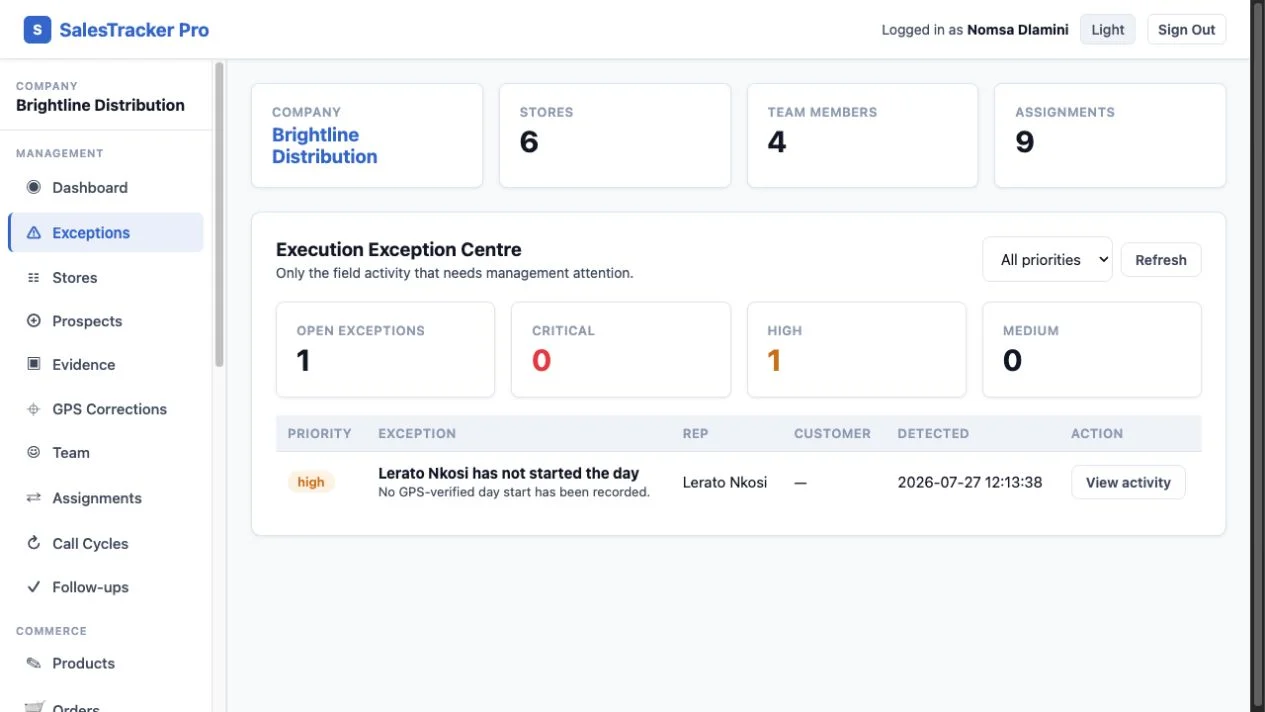
Start with the customer opportunities, commitments, and team priorities that matter today.
Bring missed visits, overdue actions, open visits, location requests, and sync issues into one useful list.
Track visits, targets, sales orders, invoice sales, credits, rep rankings, and customer value over time.
The platform connects everyday rep activity to customer development, sales opportunities, and better team decisions.
RFM scoring identifies high-value customers, declining buying patterns, overdue ordering, and accounts without sales history.
Uncompleted scheduled visits are recorded, reported, and prioritised for recovery instead of disappearing from the plan.
Alerts open the exact customer, brief, task, or action that requires attention rather than presenting a passive notification.
Share shelf status, order forms, business cards, credit documents, and competitor activity with useful photos and details.
Reps submit new opportunities with location and contact context. Admins review, assign, and convert approved prospects into customers.
Each company chooses which features its field users see, including leaderboards, targets, maps, briefs, prospects, orders, and photos.
Customers, stops, users, ownership, reports, integrations, feature choices, and automation rules are isolated inside that company's workspace.
Admins manage the company. Field users see only their assigned customers, stops, and relevant information.
Assignments separate territories and customer visibility while allowing deliberate shared pools where required.
Admins tailor the field app to the team's work while keeping the information needed to support the business.
Enable proven templates for daily briefs, missed visits, overdue follow-ups, customer risk, and sync failures.
A company can build its customer base directly in SalesTracker Pro or connect the platform to the systems it already uses. Each workspace can use its own country, timezone, currency, tax terminology, distance unit, and travel rate.
Bulk import customers and allocations, or upload an ordered daily delivery route, without requiring a CRM integration.
Connect approved external systems to customer, visit, and workflow data using company-scoped credentials.
ERP or CRM integrations are enabled only for the company that owns them. Other customers never see another company's integration.
Use a small team and a real customer list for 21 days. Prove whether SalesTracker Pro gives managers a clearer view and field users an easier daily workflow before choosing a paid plan.
Run routes, customer visits, follow-ups, orders, photos, notes, reports, and manager controls with no feature restrictions during the trial.
Start with a ready-to-use CSV structure instead of rebuilding your customer list by hand.
Follow a practical day-by-day plan that takes a small team from setup to a decision about subscribing.
Get focused help with imports, users, assignments, and the first workflow without committing to a consulting project.
If the trial is not useful, simply stop. Your company chooses whether to subscribe after the 21 days.
Every paid plan includes the complete platform. Choose only by the number of active field users your company needs after the 21-day free trial.
Complete platform access for one active field user.
Complete platform access for teams of 2-10 active field users.
Complete platform access with volume pricing for teams of 11-19 active field users.
Complete platform access for 20+ field users and complex deployment requirements.
Billed in South African rand (ZAR). Your card issuer may apply a currency conversion and foreign transaction fee.
Subscription prices are billed in South African rand; international card issuers may convert the charge. Applicable taxes and the recurring monthly total are shown before payment. Assisted onboarding and dedicated integrations are quoted separately.
No. Any business allocating repeat customer, dealer, branch, service-centre, or site visits to field teams can configure the workflow around its own terminology.
An at-store visit is checked against the saved customer coordinates and allowed radius. Remote contact is captured separately as telesales activity.
No. The rep experience is a progressive web app that runs on modern phones and computers and can be added to the device home screen.
Yes. Company admins can select each user's field role and enable the features that fit the team's work while keeping a complete business view.
Yes. Start with direct entry or CSV, use the REST API, or configure a dedicated integration for your organisation.
No. Company workspaces, users, customer records, integrations, and execution data are separated and protected by role and assignment checks.
Send a message here and it will go directly to support@salestrackerpro.co.za. We will respond by email with the next practical step.
Help the team spend more time with customers, stay on top of every opportunity, and make confident decisions together.